The most confusing thing is that on the main page of a blog, where several blog posts are listed at once, it's not at all obvious where to go to post a comment. In fact, it's downright hidden. But it's there if you know where to find it: It's the place that says the number of comments. Here's what it looks like on my blog:
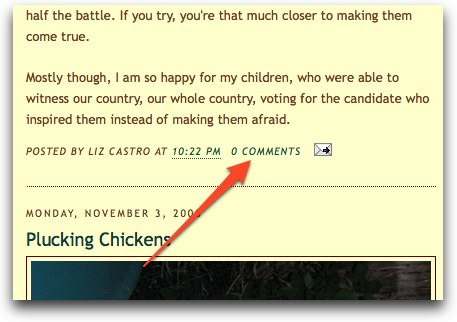
And here's what it looks like on fivethirtyeight, another Blogger-based blog:
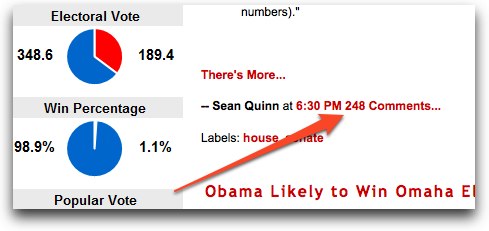
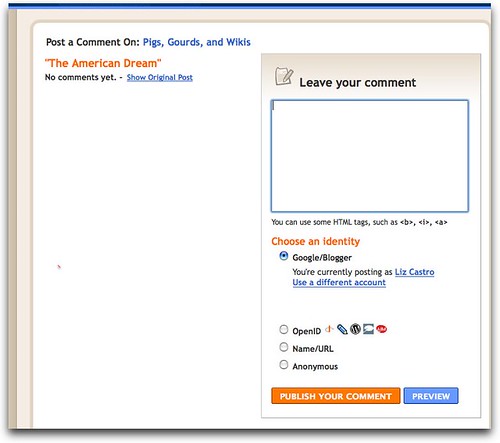
So, to add a comment, you click on the place where it says "0 comments" or "248 comments" or however many. And then you'll see something like this:
If you just see a long list of comments, but no place to add yours, like on fivethirtyeight's site, then scroll on way down to the bottom until you see where it says "Post a comment":
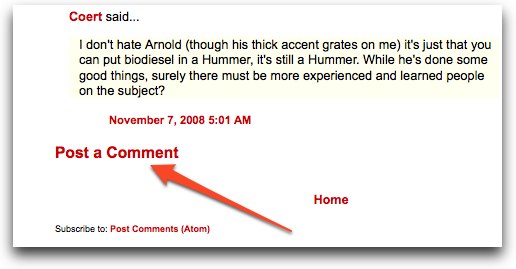
When you click "Post a comment" you get the box (like the one shown above on mine) where you can actually add the comment--though it's down at the bottom of the page.
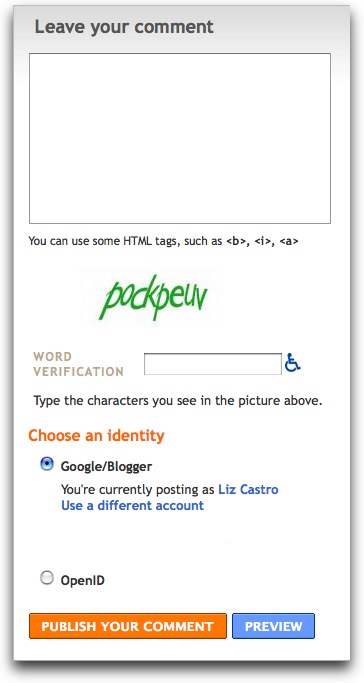
Once you get here, you can add your comments in the box at the top (under Leave a comment). You can even add a bit of formatting... add <b> before and </b> after text you want bold, the same thing with the letter "i" if you want italics, and if you want to add a link, add <a href="the page's url here">the clickable text here</a> Be careful with all that punctuation, it's all required. (To get the URL of the page, just go there and copy the address from the bar at the top of your browser window.)
Some blogs require that you sign in, some don't. Some require you to have a Blogger account, some don't. It's all up to the person who creates the blog. (On this blog, you can post comments anonymously, though I moderate them all before making them public.)
One more thing, if you're viewing a blog post's individual page... perhaps you clicked there from the navigation bar on the right, or you followed a link from another site, you'll see the Post a comment link at the bottom of the post automatically.
Further, like fivethirtyeight, some people have set up their blogs so that when you click the "n comments" link, you go to the post's individual page, not the Leave a comment page. In that case, just scroll down to the bottom of the list of comments and find the Post a comment link. That'll always bring you to the "Leave a comment" box.


