It's been ages since I've posted here—I've been more and more involved with the Catalan independence movement—and I've officially changed my website to include all of my different writing projects. I still plan to return to tech writing, and I'm fascinated with how technology, and particularly social media and direct connections have been key to winning Catalan independence. Stay tuned!
From here on, you can find me at lizcastro.com
Thanks!
Sunday, October 8, 2017

Tuesday, April 7, 2015
Twitter's new, improved quoted retweets
At the beginning, you could retweet in order to share someone else's tweet with your followers. To my knowledge, it wasn't Twitter's idea, but it came out spontaneously because it was necessary. It was a manual operation that placed an RT at the beginning of the tweet, which followed essentially intact.
People began to use MT when they substantially modified a RT before republishing. Since an RT was essentially a quote, if you changed the quote, it seemed like good practice to notify readers about the change.
At some point—maybe a year ago?—Twitter changed it so that a retweet no longer appeared with the letters RT, instead, the retweeter's Twitter profile appeared just above the tweet so that you could see who retweeted. That allowed Twitter to combine many RTs into a single line, since they could say Joe, Suzy, and Laura retweeted the following tweet.
If you manually quoted a tweet (only available on iOS as far as I could tell), Twitter would enclose the original tweet in quotation marks. Those of us who quote tweets a lot—to add comments, or in my case to translate—would manually remove the quotation marks, insert an initial RT or MT, and then add our own changes.
Yesterday, Twitter announced a new change to quoting tweets: now when you click the Retweet button, you have the option of adding comments, and when you do, you have 116 characters to do it with. That means Twitter is using up 24 characters for the citation, which comes out as a boxed image of the original tweet.
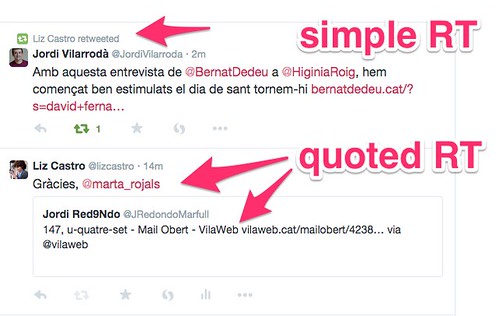
It's much better than the quotes but there are two small problems with it. First, we no longer have the option of retweeting with just a small change, perhaps an updated link or spelling correction, or added hashtag. That is, this is the only way to cite, unless you want to laboriously copy the original tweet and then create your own unlinked tweet, or reply. (On the other hand, it also makes it harder to commandeer someone else's tweet and post it as if it were your own.) Second, and more importantly for me, once you hit the RT button, on iOS you can't see the full text of the original, which is a problem if you're translating, or can't remember if it included the hashtag you wanted. The second problem is easily fixed, I hope they do.
This is a big change for people who quote (or translate) a lot of tweets, and have often wished they could 1) use more the space and not have to leave so much for the original hashtag or author and 2) because it will definitively distinguish regular RTs from commented ones, and maybe even clean up a timeline so that you can clearly see conversations about a single original tweet. Instead of the same tweet appearing many times, it will now appear once, with comments clearly delineated. Hopefully.
Update: I would swear that it wasn't working on desktop this morning, but now it seems to be.
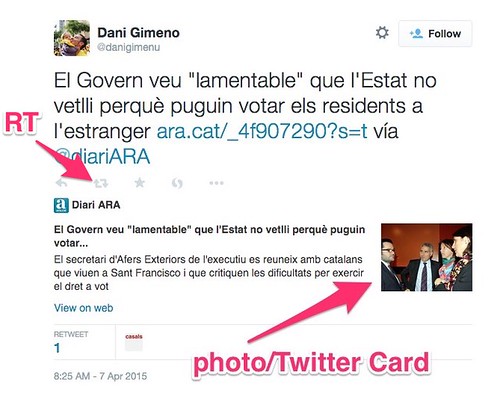
Imagine this original tweet that I want to comment-tweet (and notice it contains an embedded Twitter card with photo):
Click the RT button, and now you get a space where you can add comments:
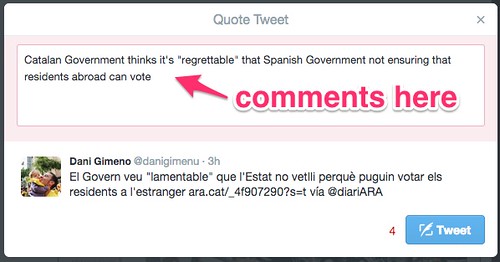
But that reveals another problem. When you comment a tweet, Twitter doesn't display the original URL's embedded Twitter card, or photo. Which is a big deal since tweets with photos get a lot more attention than those without.
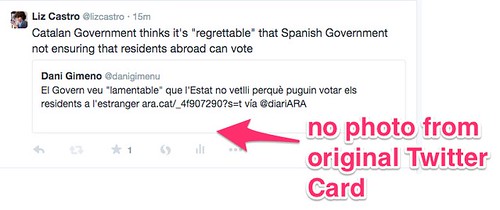
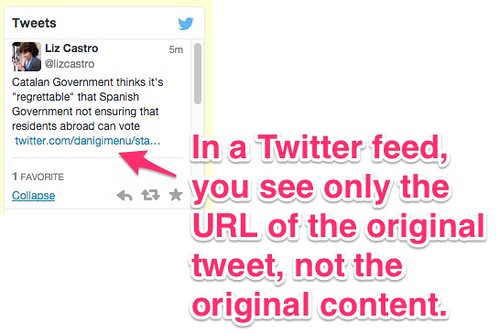
And in a Twitter feed, it doesn't show the Twitter Card (and photo) or even the text of the original tweet!
In some cases, you may be better off cooking your own.
People began to use MT when they substantially modified a RT before republishing. Since an RT was essentially a quote, if you changed the quote, it seemed like good practice to notify readers about the change.
At some point—maybe a year ago?—Twitter changed it so that a retweet no longer appeared with the letters RT, instead, the retweeter's Twitter profile appeared just above the tweet so that you could see who retweeted. That allowed Twitter to combine many RTs into a single line, since they could say Joe, Suzy, and Laura retweeted the following tweet.
If you manually quoted a tweet (only available on iOS as far as I could tell), Twitter would enclose the original tweet in quotation marks. Those of us who quote tweets a lot—to add comments, or in my case to translate—would manually remove the quotation marks, insert an initial RT or MT, and then add our own changes.
Yesterday, Twitter announced a new change to quoting tweets: now when you click the Retweet button, you have the option of adding comments, and when you do, you have 116 characters to do it with. That means Twitter is using up 24 characters for the citation, which comes out as a boxed image of the original tweet.
It's much better than the quotes but there are two small problems with it. First, we no longer have the option of retweeting with just a small change, perhaps an updated link or spelling correction, or added hashtag. That is, this is the only way to cite, unless you want to laboriously copy the original tweet and then create your own unlinked tweet, or reply. (On the other hand, it also makes it harder to commandeer someone else's tweet and post it as if it were your own.) Second, and more importantly for me, once you hit the RT button, on iOS you can't see the full text of the original, which is a problem if you're translating, or can't remember if it included the hashtag you wanted. The second problem is easily fixed, I hope they do.
This is a big change for people who quote (or translate) a lot of tweets, and have often wished they could 1) use more the space and not have to leave so much for the original hashtag or author and 2) because it will definitively distinguish regular RTs from commented ones, and maybe even clean up a timeline so that you can clearly see conversations about a single original tweet. Instead of the same tweet appearing many times, it will now appear once, with comments clearly delineated. Hopefully.
Update: I would swear that it wasn't working on desktop this morning, but now it seems to be.
Imagine this original tweet that I want to comment-tweet (and notice it contains an embedded Twitter card with photo):
Click the RT button, and now you get a space where you can add comments:
But that reveals another problem. When you comment a tweet, Twitter doesn't display the original URL's embedded Twitter card, or photo. Which is a big deal since tweets with photos get a lot more attention than those without.
And in a Twitter feed, it doesn't show the Twitter Card (and photo) or even the text of the original tweet!
In some cases, you may be better off cooking your own.
Thursday, March 26, 2015
Periscope - Twitter releases its own video streaming app
I've been hounding Periscope for a beta copy of their software from the moment I heard about it. It didn't help. Thank goodness (for them and me!) they released the program today and I was able to start testing it without bombarding them with any more bad poetry.
Curiously enough, I found out about Periscope as I was attending a conference on "Proximity Journalism" at the CosmoCaixa Auditorium in Barcelona. Live-streaming video seems a key component of proximity journalism, in my opinion.
For those of you who don't know, Meerkat and Periscope are applications which permit streaming video from the iPhone, and which permit some levels of sharing through Twitter.
I haven't yet tried Periscope out beyond Wifi coverage, but I'll do that in a few minutes. For now, here's what I've found, including similarities and differences with Meerkat. Thanks to Saül Gordillo who immediately downloaded both apps when I told him about them, and began to play with them in the row of seats right in front of me, allowing me to test a number of features.
Both apps work similarly. You open the app, optionally explain the video you're about to stream, and then begin broadcasting. If you click the Twitter icon in Periscope before beginning, your stream will be automatically tweeted in Twitter (as well as to your Periscope followers).
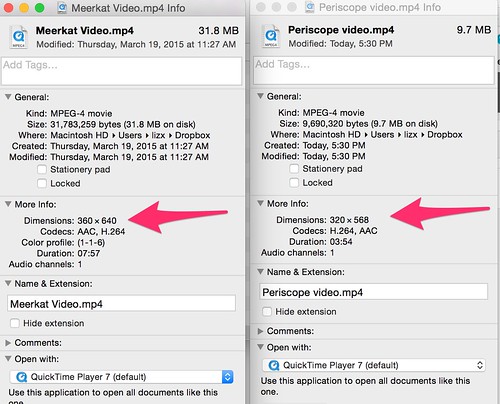
Periscope records video at 320 x 568 while Meerkat grabs a slightly better quality of 360 x 640. The difference in quality is notable, as viewing is better for Meerkat, and the files are 50% larger. A 4 minute Periscope video takes up about 10Mb, 8 minutes on Meerkat is about 30Mb.
Another important difference is that Periscope allows landscape recording (that is, using the entire width of the phone), while Meerkat always records/plays vertical video even if you are holding the phone horizontally. This has an interesting effect: while you can't manually zoom either program's video, if you record Meerkat horizontally you get a zoomed in effect with respect to portrait mode, since the image is cropped and zoomed to fit.
Both apps let users subscribe to other users, be notified when that user is broadcasting video, and comment on videos as they are being broadcast. Viewers can see the video on a desktop browser, but can't interact. On an iPhone they can not only view, but add comments (which are then added to their Twitter stream, unfortunately, without the stream's URL).
Periscope has a killer feature in this respect: you can save broadcasts and replay them later. Since 90% of Meerkat videos seem to have finished by the time you get to them, this is clearly an important benefit. It also shows any comments and viewers that the video had. Note that you can't watch the replays on a desktop browser, but you can save the URL, send it to an iPhone, and watch the video there.
Periscope also has a private video feature. I haven't tried it yet, but it seems pretty straightforward—and powerful.
Happily, Periscope allows you to review who watched the video, both when it was live, and through replays. To find your own replays, go to the Watch section of the screen (the TV set) and scroll to the bottom.
Both apps let you save a broadcast to your iPhone.
Here's a sample Periscope video, recorded at the Proximity Journalism (#JornadaProximitat) conference at CosmoCaixa in Barcelona on March 26, 2015.
You can read my initial thoughts about Meerkat here. I guess it's obvious, but I think these technologies are extremely important. What would you like to see broadcast live from Barcelona?
Curiously enough, I found out about Periscope as I was attending a conference on "Proximity Journalism" at the CosmoCaixa Auditorium in Barcelona. Live-streaming video seems a key component of proximity journalism, in my opinion.
For those of you who don't know, Meerkat and Periscope are applications which permit streaming video from the iPhone, and which permit some levels of sharing through Twitter.
I haven't yet tried Periscope out beyond Wifi coverage, but I'll do that in a few minutes. For now, here's what I've found, including similarities and differences with Meerkat. Thanks to Saül Gordillo who immediately downloaded both apps when I told him about them, and began to play with them in the row of seats right in front of me, allowing me to test a number of features.
Both apps work similarly. You open the app, optionally explain the video you're about to stream, and then begin broadcasting. If you click the Twitter icon in Periscope before beginning, your stream will be automatically tweeted in Twitter (as well as to your Periscope followers).
Periscope records video at 320 x 568 while Meerkat grabs a slightly better quality of 360 x 640. The difference in quality is notable, as viewing is better for Meerkat, and the files are 50% larger. A 4 minute Periscope video takes up about 10Mb, 8 minutes on Meerkat is about 30Mb.
Another important difference is that Periscope allows landscape recording (that is, using the entire width of the phone), while Meerkat always records/plays vertical video even if you are holding the phone horizontally. This has an interesting effect: while you can't manually zoom either program's video, if you record Meerkat horizontally you get a zoomed in effect with respect to portrait mode, since the image is cropped and zoomed to fit.
Both apps let users subscribe to other users, be notified when that user is broadcasting video, and comment on videos as they are being broadcast. Viewers can see the video on a desktop browser, but can't interact. On an iPhone they can not only view, but add comments (which are then added to their Twitter stream, unfortunately, without the stream's URL).
Periscope has a killer feature in this respect: you can save broadcasts and replay them later. Since 90% of Meerkat videos seem to have finished by the time you get to them, this is clearly an important benefit. It also shows any comments and viewers that the video had. Note that you can't watch the replays on a desktop browser, but you can save the URL, send it to an iPhone, and watch the video there.
Periscope also has a private video feature. I haven't tried it yet, but it seems pretty straightforward—and powerful.
Happily, Periscope allows you to review who watched the video, both when it was live, and through replays. To find your own replays, go to the Watch section of the screen (the TV set) and scroll to the bottom.
Both apps let you save a broadcast to your iPhone.
Here's a sample Periscope video, recorded at the Proximity Journalism (#JornadaProximitat) conference at CosmoCaixa in Barcelona on March 26, 2015.
You can read my initial thoughts about Meerkat here. I guess it's obvious, but I think these technologies are extremely important. What would you like to see broadcast live from Barcelona?
Saturday, March 21, 2015
Who told you a calf to be?
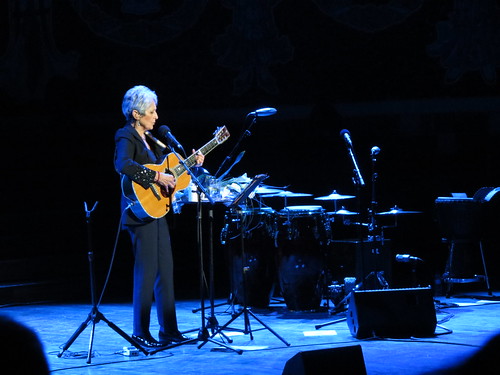
I went to see Joan Baez at Barcelona's incredible Palau de la Música last night. She and her music were a fundamental part of my growing up. I learned French partly to understand the words on Wildflower, I learned some piano to play the lovely intro to Both Sides Now. But mostly I remember my mom, an outspoken feminist in the 1970's, who worked long hours and then seemed always at a meeting to fix one thing or another, once in a while, to my delight, picking up a guitar and singing. Singing was my image of her as a *mom*. Don't think twice, it's all right. Suzanne. Hey, that's no way to say goodbye. Where have all the flowers gone?
In highschool I learned Donna Donna and took it on as a life lesson (and it's a good one for Catalans too!): Stop complaining, said the farmer, who told you a calf to be? Why don't you have wings to fly with, like the swallow so proud and free?
So when I read Ignasi Aragay's column in ARA newspaper last December, in which he explains how in a concert in 1977 Baez misinterpreted the Catalan people's love for their language and culture as some sort of unhealthy 'nationalism', I decided to write her. I confess it's not the first time I've written letters to famous compatriots that I don't know, and I admit it probably won't be the last.
I explained how important the language is to the people here, how peaceful their movement, how determined their cause. And I sent her a copy of my book What's up with Catalonia? I asked only that she be mindful that people want her to sing in Catalan because it's their language, nothing more simple.
At the end of February, I received a reply from her assistant. Thank you for your letter, and the book, I'll make sure she gets them. And then a special P.S.: Are you the Elizabeth Castro who writes books on HTML? I have a couple of your books, they've been my two little bibles.
I didn't sleep much that night. I took the PS as an invitation. I wrote once again, describing my new book Many Grains of Sand, a collection of photographs that explain the incredible variety of creative, peaceful, democratic, even joyful initiatives that Catalans have undertaken to make their voices heard. I explained this was just the sort of movement that Joan would be proud to be a part of. I asked if she would come talk to us, inspire us, encourage us.
That night, I received a reply from Joan herself. She insisted she is still not a nationalist, that she has wished for a borderless world since she was a teenager. But she also said she understood the "emotion and reason" behind the Catalan struggle and praised the "courage and passion" of our movement. And then she asked me for a song she could sing to show her alliance with our cause.
Another sleepless night! What a huge responsibility. I wanted a song that was well-known, easy to sing for a non-Catalan speaker, inspiring, and especially, beautiful. I chose Lluís Llach's Més Lluny after hearing it sung by my companions in Cor País Meu. I translated it, and found a version on YouTube and sent it to her. She said it was beautiful.
Last night when we got to the concert hall, I received another email from Joan. She was not going to sing the song after all, she was worried it wasn't well known enough; the people who she had asked didn't know it. I was so disappointed. So I sent a note on a scrap of paper via the receptionist, promising that people would sing with her and never forget that night.
We did sing with her, and we will never forget the night that Joan Baez inspired us with Catalan folk hero Lluís Llach's music to go “Farther, ever farther”.
(This recording is actually of the second night.)
After the show, Joan invited us backstage to say hello. I brought her a collection of Catalan music: Maria del Mar Bonet, Marina Rossell, and a compilation of Catalan artists, including Lluís Llach. I know that it is the music that brings us together. Perhaps we'll have another surprise next time she comes back.
_______
Lluís Llach, probably Catalonia's best known folksinger, wrote the music and adapted the lyrics from Catalan poet Carles Riba's translation of Greek poet Constantine P. Cafavy's “Visit to Ithaca”. Here is my translation (with the original lyrics following)
Farther, you have to go farther
beyond the fallen trees that imprison you.
And when you have won them,
be sure not to stop.
Farther, you have to go ever farther,
farther than the today that keeps you in chains.
And when you are free
you will begin new steps again.
Farther, always farther,
Farther than the tomorrow that approaches.
And when you think you have arrived, know how to find new paths.
----------
Més lluny, heu d'anar més lluny
dels arbres caiguts que ara us empresonen,
i quan els haureu guanyat
tingueu ben present no aturar-vos.
Més lluny, sempre aneu més lluny,
més lluny de l'avui que ara us encadena.
I quan sereu deslliurats
torneu a començar els nous passos.
Més lluny, sempre molt més lluny,
més lluny del demà que ara ja s'acosta.
I quan creieu que arribeu,
sapigueu trobar noves sendes.
Thursday, March 19, 2015
Meerkat testing - streaming video on Twitter
I tried tweeting some vines (very short, sometimes edited videos) a few weeks ago during the Sant Medir festival here in my Barcelona neighborhood of Gràcia and really liked the idea of capturing an event with video and not just photos.
Today, I tested Meerkat, which everybody has been talking about since it's debut (ish) at SXSW.
I went to a lovely little square in Gràcia, in the middle of Barcelona to do a test. A few things I learned:
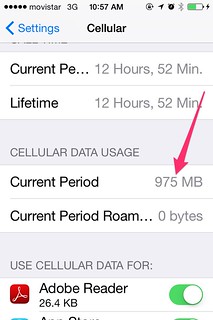
1. It doesn't use as much data as you might think. My 8 minute video was broadcast using only 25Mb of data from my 3G network (you can test this by going to Settings > Cellular > and then checking the figures at Cellular Data Usage for the Current Period before and after you meerkat). I got a couple of "low bandwidth" warnings, but these are not reflected in the final video. I asked the people watching, and they told me that they didn't notice a lag.

2. You can see tweets from people who are watching your meerkat stream as you broadcast, and you can answer, but those tweets are not saved when you save the video later. Further, all of your tweets are sent to your own Twitter timeline prefaced with your user name (why?), but they don't reference the meerkat stream (why not!?) so anybody looking at your Twitter stream who hasn't seen the initial | LIVE NOW | notice just thinks you're talking to yourself.
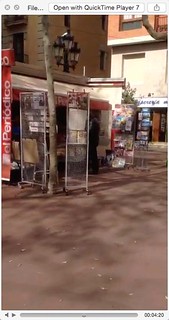
3. Instead of tweet commentary, it's better to add audio (thanks Patrick Jackson!). I had my headphones so the microphone was close by. Then I could explain what I was streaming and answer questions from people who were watching.
4. Once you've stopped broadcasting, Meerkat gives you the option of saving your video. The first time I tried, it gave me an error, but it let me try again, and then it saved. Remember that any tweets that accompanied the video are not saved. It would be nice to have the option. The 8 minute video takes up 31Mb. (It may be that that's the same amount of data that was used, Settings doesn't give exact figures.) Quality is very reasonable.
5. Patrick tells me you can only stream vertical video and that if you rotate the phone, you simply lose 2/3 of the screen. That's too bad. (I didn't try it.)
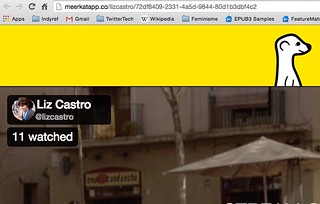
6. You don't have to have Meerkat installed in order to watch video. Of course, you do need the program (available currently only for iOS) to add tweet comments (which is only visible while it's being broadcast) or to stream your own productions. Once the broadcast is over, Meerkat does not give a lot of information about what was shown, or where you might find the video (since it is not saved anywhere except on the broadcaster's phone, if they've chosen to save it). It does tell you how many people watched. In my case, for this first meerkat, there were 11 people watching, including Patrick and some other journalists I was talking to just before the test. I couldn't figure out a way to see who those 11 were, or to follow them back. This clearly very new software.
7. Wow, there are so many possibilities. As Patrick says, there are three upcoming elections in Barcelona, the city elections (which may be a bellwether for the Parliamentary turned plebescite elections for independence in September) and then the Spanish general elections later in the fall, in which many pro-independence supporters are promoting either a total boycott, or going enmasse to demand recognition of the previous independence vote. And there are always protests, and speeches, and cassolades…
Not to mention all of the cultural events, or concerts... Hmmmm.
Questions to be answered:
1. What are the legal ramifications? Do same legal rules apply about livestreaming bystanders as when photographing them?
2. How can you get more people to be involved, watching, commenting?
3. What happens if a lot of people try to meerkat the same event? How quickly before bandwidth gets jammed?
I'm sure there are many more. What do you want to know? How would you use this software? What would you like to see streamed from Barcelona?
Today, I tested Meerkat, which everybody has been talking about since it's debut (ish) at SXSW.
I went to a lovely little square in Gràcia, in the middle of Barcelona to do a test. A few things I learned:
1. It doesn't use as much data as you might think. My 8 minute video was broadcast using only 25Mb of data from my 3G network (you can test this by going to Settings > Cellular > and then checking the figures at Cellular Data Usage for the Current Period before and after you meerkat). I got a couple of "low bandwidth" warnings, but these are not reflected in the final video. I asked the people watching, and they told me that they didn't notice a lag.
2. You can see tweets from people who are watching your meerkat stream as you broadcast, and you can answer, but those tweets are not saved when you save the video later. Further, all of your tweets are sent to your own Twitter timeline prefaced with your user name (why?), but they don't reference the meerkat stream (why not!?) so anybody looking at your Twitter stream who hasn't seen the initial | LIVE NOW | notice just thinks you're talking to yourself.
3. Instead of tweet commentary, it's better to add audio (thanks Patrick Jackson!). I had my headphones so the microphone was close by. Then I could explain what I was streaming and answer questions from people who were watching.
4. Once you've stopped broadcasting, Meerkat gives you the option of saving your video. The first time I tried, it gave me an error, but it let me try again, and then it saved. Remember that any tweets that accompanied the video are not saved. It would be nice to have the option. The 8 minute video takes up 31Mb. (It may be that that's the same amount of data that was used, Settings doesn't give exact figures.) Quality is very reasonable.
5. Patrick tells me you can only stream vertical video and that if you rotate the phone, you simply lose 2/3 of the screen. That's too bad. (I didn't try it.)
6. You don't have to have Meerkat installed in order to watch video. Of course, you do need the program (available currently only for iOS) to add tweet comments (which is only visible while it's being broadcast) or to stream your own productions. Once the broadcast is over, Meerkat does not give a lot of information about what was shown, or where you might find the video (since it is not saved anywhere except on the broadcaster's phone, if they've chosen to save it). It does tell you how many people watched. In my case, for this first meerkat, there were 11 people watching, including Patrick and some other journalists I was talking to just before the test. I couldn't figure out a way to see who those 11 were, or to follow them back. This clearly very new software.
7. Wow, there are so many possibilities. As Patrick says, there are three upcoming elections in Barcelona, the city elections (which may be a bellwether for the Parliamentary turned plebescite elections for independence in September) and then the Spanish general elections later in the fall, in which many pro-independence supporters are promoting either a total boycott, or going enmasse to demand recognition of the previous independence vote. And there are always protests, and speeches, and cassolades…
Not to mention all of the cultural events, or concerts... Hmmmm.
Questions to be answered:
1. What are the legal ramifications? Do same legal rules apply about livestreaming bystanders as when photographing them?
2. How can you get more people to be involved, watching, commenting?
3. What happens if a lot of people try to meerkat the same event? How quickly before bandwidth gets jammed?
I'm sure there are many more. What do you want to know? How would you use this software? What would you like to see streamed from Barcelona?
Friday, March 6, 2015
Customizing a Twitter feed widget
I haven't posted here in way too long, partly because the blog had veered so far toward e-book publishing that I worried that posting about anything else was distracting. I think I just worry too much. Today I return to this blog about "pigs" (local food, buying local, etc.), "gourds" (creating beautiful things, by hand or by bits), and "wikis" (technology, ebooks, twitter, publishing, etc.) I hope you enjoy what I share here.
This post comes from a Twitter workshop series that I've been doing in Catalan over at Dra. Piula. I mean to translate it into English, but for now I may just do highlights. We'll see. But I thought this post about customizing a Twitter feed widget would interest a lot of English speakers as well. Here goes:
-----
You may already know how to create a Twitter widget for your blog or WordPress. It's not hard. You go to Settings in Twitter, click Widgets on the left, Create New on the right, and then choose criteria for the contents of the Twitter feed. Then click Create, and copy the code to your blog.
But how can you go beyond Twitter's basic search options? At first glance, it looks like you have to choose between a User timeline OR Favorites OR a List OR Search OR a Collection:
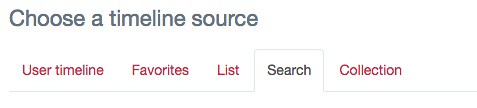
But what do you do if you want a user's timeline with a certain hashtag? What if you only want to someone's tweets in English? :) Or you want to see all of the tweets of a group, but only regarding a particular topic?
I'll show you.
To begin, make a normal widget using the Search option and enter the first topic that interests you into the Search Query box:
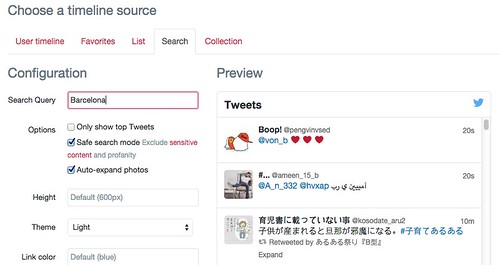
Notice that the Preview populates with all of the tweets that satisfy that criteria, which I can promise for Barcelona, means a lot of varied tweets.
Let's search only for tweets in English. Use lang:en (the two letter language code for English. And note that ca is for Catalan, but it doesn't work).
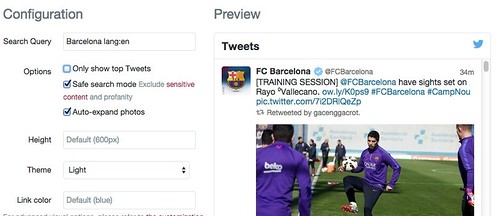
Now let's get rid of tweets that mention FCBarcelona, as much as we may love them, since they tend to block everything else out about Barcelona. Use -FCBarcelona
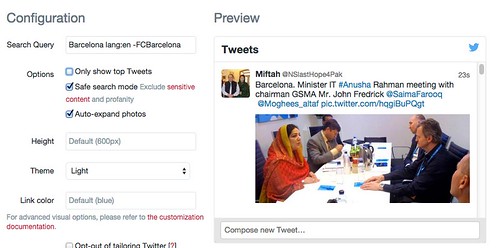
How about only tweets (and retweets) by me? Use from:lizcastro
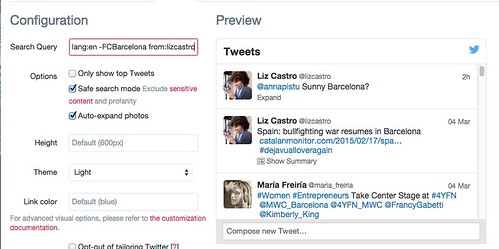
The possibilities are endless. You can precisely tailor your Twitter feed gadget to your audience, without having to limit your activity on Twitter itself.
What other criteria can we use for a search? Here's all the ones I found:
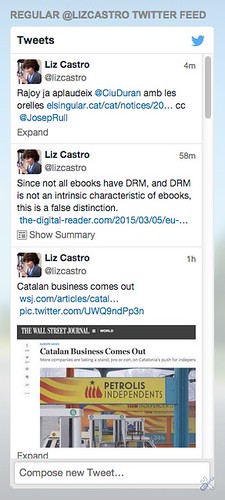
This post comes from a Twitter workshop series that I've been doing in Catalan over at Dra. Piula. I mean to translate it into English, but for now I may just do highlights. We'll see. But I thought this post about customizing a Twitter feed widget would interest a lot of English speakers as well. Here goes:
-----
You may already know how to create a Twitter widget for your blog or WordPress. It's not hard. You go to Settings in Twitter, click Widgets on the left, Create New on the right, and then choose criteria for the contents of the Twitter feed. Then click Create, and copy the code to your blog.
But how can you go beyond Twitter's basic search options? At first glance, it looks like you have to choose between a User timeline OR Favorites OR a List OR Search OR a Collection:
But what do you do if you want a user's timeline with a certain hashtag? What if you only want to someone's tweets in English? :) Or you want to see all of the tweets of a group, but only regarding a particular topic?
I'll show you.
To begin, make a normal widget using the Search option and enter the first topic that interests you into the Search Query box:
Notice that the Preview populates with all of the tweets that satisfy that criteria, which I can promise for Barcelona, means a lot of varied tweets.
Let's search only for tweets in English. Use lang:en (the two letter language code for English. And note that ca is for Catalan, but it doesn't work).
Now let's get rid of tweets that mention FCBarcelona, as much as we may love them, since they tend to block everything else out about Barcelona. Use -FCBarcelona
How about only tweets (and retweets) by me? Use from:lizcastro
The possibilities are endless. You can precisely tailor your Twitter feed gadget to your audience, without having to limit your activity on Twitter itself.
What other criteria can we use for a search? Here's all the ones I found:
- To search for a given word or hashtag, just list it:
Barcelona,#MWC15, etc. - To exclude criteria from the search, use a minus sign:
-beachor-from:troll - To find tweets in only a given language, use lang followed by the two letter code for the desired language:
lang:enorlang:fr. Unfortunately, Twitter doesn't know how to distinguish tweets that are in Catalan, sometimes it thinks they're Portuguese, sometimes Romanian, sometimes Italian. And if I tell it to show me only Catalan tweets, it doesn't show any at all :( - By default, RTs are included. If you don't want them, add
exclude:nativeretweets - If you want only tweets that contain images, use
filter:images - If you want only tweets that contain videos, use
filter:videos - If you want only tweets that contain vines, use
filter:vines - If you want tweets with links, use
filter:links - If you want tweets from a given Twitter account, use
from:TwitterName(no @ needed) - If you want only tweets from verified Twitter accounts, use
filter:verified - If you want tweets only from the accounts belonging to a given list, use
list:list owner name/list name - If you want only tweets who have received a given number of replies, use
min_replies:n, where n is that number - If you want only tweets with a certain number of favorites, type
min_faves:n, where n is that number - If you want only tweets with a certain number of RTs, use
min_retweets:n, where n is that number
You can use AND, OR and parentheses to combine criteria:
- If you separate each criteria with a space, Twitter concludes that you want only tweets that satisfy all the criteria. As if you typed an AND between them. So
Catalan independencewill get you tweets that include both Catalan and independence. - If you separate each criteria with an OR, Twitter will show you tweets that satisfy either one criteria or the other.
- If you want to exclude a criteria, use the minus sign (equivalent to NOT).
- You can use parentheses to combine criteria in various ways
(Catalan OR independence) lang:enwould get you all tweets in English that talk about either Catalan or the independence (so you might get Catalan books or Scottish independence, for example).
Are you thinking about all the possibilities?
- Combine
from:usernameandmin_retweets:100to get only the user's most popular tweets - Combine
from:usernameandlang:ento get only a user's tweets in a given language - Combine
from:usernameand-lang:ento get only a user's tweets that are not in English - Combine
from:usernamewith a search term to see only the user's tweets that are about a given topic - Combine
list:listowner/listnameand-from:usernameto get all of the tweets from a list, except for from one person in particular - And so on and so on.
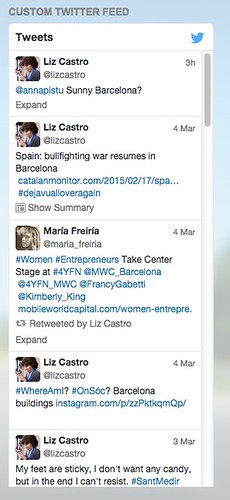
To sum up, let's look at that Twitter feed we created, with tweets from me, about Barcelona, not including FCBarcelona, and only in English (on the left) compared with my standard Twitter feed on the right:
Thursday, October 24, 2013
Why iBooks for Mac Matters (Goodbye, PDF!)
We folks who create ebooks have been waiting for iBooks for Mac for a long time as a testing tool. Copying EPUB files from one device to another is a hassle and being able to see a book right where you've created it is frankly, this side of wonderful.
But of course, we #eprdctn people are not at all the point. Apple's release of iBooks for Mac in its new Mavericks operating system is a huge step for ebooks and EPUB because it makes EPUB available where people want to use it: on their desktops. The fact that this is the very same format—and the very same files—that works in their ereaders and tablets is icing on the cake.
Have you ever tried to send someone an ebook? It's not fun. Most normal people out in the world have never heard of EPUB and if you start explaining how to download a Firefox extension or make them buy a program to open it, they'll smile (if you're lucky) and go do something else.
Up until now, if you wanted someone to be able to open an ebook easily, you sent it in PDF format. And frankly, PDF is a dead end. It works ok on a computer, but it's miserable for reading on smaller devices. (No apologies to you PDF folks, sorry, and don't flame me in the comments. I don't care that on some Android devices, a PDF is slightly readable. I want an open, universal, flexible, standard format, and that's EPUB.)
What's PDF's great advantage? After years of downloading Adobe Acrobat Reader, most people have it on their computers, and when they double-click a PDF, something miraculous happens: it opens.
The last Pew Research Center poll about ebook reading (April 2012) says that more people read ebooks on their computers than on any other devices. In fact, 42% of the Americans who had read an ebook had read it on their computers, similar to the 41% who read on black and white ereaders, 29% on cell phones, and 23% on tablets. And that was 18 months ago, in the US.
In Spain in 2012, just to give one example in Europe, 55.8% of ebook readers use a computer to read their ebooks, compared with only 6.6% who use ereaders. According to the Spanish Publishers Guild only 9.7% even own an ereader. (I wished they gathered data about mobile phone reading, but they don't.)
At any rate, until Mavericks, if they were reading on a computer, they were reading in PDF. But Apple changes that. Not only has Apple released a fairly decent EPUB reader—that supports both EPUB2 and EPUB3, and both fixed and flowing formats—the most important thing is that iBooks for Mac is included in the Mavericks installation automatically.
That means people don't have to even know iBooks exists. You send them an EPUB file, they double-click it, and it opens.


Pure magic. They can read all kinds of ebooks, as large or small as they like, with JavaScript, audio, video, media overlays (read aloud), and in Asian languages with right-to-left page progression where necessary. It just works.
Now, why was that so hard?
But of course, we #eprdctn people are not at all the point. Apple's release of iBooks for Mac in its new Mavericks operating system is a huge step for ebooks and EPUB because it makes EPUB available where people want to use it: on their desktops. The fact that this is the very same format—and the very same files—that works in their ereaders and tablets is icing on the cake.
Have you ever tried to send someone an ebook? It's not fun. Most normal people out in the world have never heard of EPUB and if you start explaining how to download a Firefox extension or make them buy a program to open it, they'll smile (if you're lucky) and go do something else.
Up until now, if you wanted someone to be able to open an ebook easily, you sent it in PDF format. And frankly, PDF is a dead end. It works ok on a computer, but it's miserable for reading on smaller devices. (No apologies to you PDF folks, sorry, and don't flame me in the comments. I don't care that on some Android devices, a PDF is slightly readable. I want an open, universal, flexible, standard format, and that's EPUB.)
What's PDF's great advantage? After years of downloading Adobe Acrobat Reader, most people have it on their computers, and when they double-click a PDF, something miraculous happens: it opens.
The last Pew Research Center poll about ebook reading (April 2012) says that more people read ebooks on their computers than on any other devices. In fact, 42% of the Americans who had read an ebook had read it on their computers, similar to the 41% who read on black and white ereaders, 29% on cell phones, and 23% on tablets. And that was 18 months ago, in the US.
In Spain in 2012, just to give one example in Europe, 55.8% of ebook readers use a computer to read their ebooks, compared with only 6.6% who use ereaders. According to the Spanish Publishers Guild only 9.7% even own an ereader. (I wished they gathered data about mobile phone reading, but they don't.)
At any rate, until Mavericks, if they were reading on a computer, they were reading in PDF. But Apple changes that. Not only has Apple released a fairly decent EPUB reader—that supports both EPUB2 and EPUB3, and both fixed and flowing formats—the most important thing is that iBooks for Mac is included in the Mavericks installation automatically.
That means people don't have to even know iBooks exists. You send them an EPUB file, they double-click it, and it opens.
Pure magic. They can read all kinds of ebooks, as large or small as they like, with JavaScript, audio, video, media overlays (read aloud), and in Asian languages with right-to-left page progression where necessary. It just works.
Now, why was that so hard?
Wednesday, October 23, 2013
Quick iBooks for Mac preview
Update: Several people have reported to me that iBooks for Mac does not support pop-up footnotes. Hopefully that's a bug that will be fixed soon!
Although there have been ebook readers for the Mac for some time, I was very pleased to hear that Apple's new operating system (Mavericks) includes iBooks for the Mac—which in contrast with most other desktop ereaders (except Readium) supports both flowing and fixed layout and both EPUB 2 and EPUB 3 format ebooks. Since iBooks is free and installed automatically, this means that Mavericks users will be able to double-click an EPUB file from the desktop—or an email message—and have it open right up.

I was very anxious to see what iBooks might look like on the Mac. But I'm not so foolhardy as to install a brand new operating system on my computer while I'm finishing up a couple of big projects, so I installed it on my daughter's computer instead! I thought I'd give you a quick rundown of what I found.
First, you don't have to install iBooks separately, it comes included with Mavericks. I found it on the dock: an orange circle with an open book.

When I opened it up, it immediately asked me to sign in with my AppleID—it feels like you can't go anywhere these days without identification. I find it a bit oppressive, especially since I wasn't on my own computer. And though it let me log in, I couldn't download any of my purchased books because I had already authorized five computers and this wasn't one of them. So I went and deauthorized them all and then reauthorized this one only to be warned that if I downloaded books from this particular AppleID account, I wouldn't be able to download items from a different AppleID account (e.g., my daughter's, who owns the computer) for 90 days. I didn't think she'd be very happy with me, so I didn't do it. I tried creating a separate user and then opened iBooks again, but got the same error. So I opted not to download any of my already purchased books.

This was frustrating to me. I should be able to access my purchases on any device to which I log in, whether or not someone else also has an account there. This means iBooks doesn't really work in the cloud—it only works on your personal devices on the cloud, not at the library, or at the vacation house you rented, or on the computer you borrowed from your daughter.
For testing purposes, however, I don't have any trouble getting my hands on other EPUB documents. I chose an EPUB3 flowing book, and EPUB3 fixed layout book with JavaScript, and a fixed layout book with EPUB2-style read aloud.
To load them into iBooks you choose not File > Open Book (which remains stubbornly grayed out, and refers to opening a book that's already in iBooks), but rather File > Add to Library. You can add a few by command- or shift-clicking multiple items in the dialgo box. Click the Add button and you'll see them listed in your library screen.

If you've logged in with your AppleID, you'll also see any books that you'd previously purchased, with tantalizing cloud icons in their upper right corners. Display the books' authors and titles by choosing "Show Title & Author" from the Sort By menu in the upper right corner of the Library window.
Let's look first at the flowing book (double-click to open). I used What's up with Catalonia? (a recent collection of essays from leading Catalan leaders and thinkers on the independence movement there).
The default view is a two-page spread. The cover is shown on the left-hand side, which in my case, shifted the copyright page to the right-hand page, and the title page to the left-hand page, an effect I didn't like much. But of course, there's not a lot of control with a flowing book, so I bit my tongue.
You can switch to a one-page view by choosing View > Single Page or by simply dragging the right edge of the page to make the layout narrower. iBooks will let you view a narrow single page, or you can drag it out to make it wider.


If you get too wide, iBooks will first add white margins around the text, and finally it will shift to a two-page layout to keep the text from displaying on excessively long lines. You'd think you could choose View > Two Pages to go to the two-page spread view, but although it was automatically chosen when I pulled the layout out manually, it was always grayed out, and I couldn't ever choose it. Looks like a bug.


Click the full-screen option (diagonal arrows in the right top corner to fill the window with the screen, which means a two-page spread with moderately wide paragraphs and ample margins.

Make the text larger with Command-+, and then make it smaller with Command-–.

And yes, you can make the text sufficiently large so that a full-view contains only a single page.

But you can't make it so small as to force a third page.
Turn pages either by clicking the arrows that appear when you hover over the right or left edges of the page, or perhaps more easily by clicking the right and left arrows on your keyboard.

Consult a dictionary for the definition of a word by double-clicking the word in question.

If you select a phrase or two, you can choose to highlight (or underline) the text for further reference, add a note, copy it, look it up in the dictionary, search the web or Wikipedia, or post the selected text to Facebook, Twitter, send it in a Message or Email, or (with Start Speaking) read the selection out loud.

iBooks appends a link to the excerpt's book on the iBookstore, but that link only works if the copy came from the actual copy of the book on the iBookstore (and not a local version).

If you already know you want to highlight, hold down the Command key while you're selecting text.
iBooks won't let you copy more than a few paragraphs of text at a time, presumably for copyright reasons.
You can see the contents of a note in two ways. First, you can click the little note icon next to the highlighted text itself. Or you can view all your notes and highlighted text by clicking the small page icon on the left side of the window. The notes will be organized by chapter—as long as the book is in EPUB3 format with a proper NAV document. If the ebook is in EPUB2 document, the notes are displayed in chronological order, which seems a lot less useful, to be honest. You can jump to the referenced section in the book by clicking the page number next to the note.

You can consult the Table of Contents by clicking the bulleted list icon in the upper-left corner. Note that the chapter currently being viewed will be highlighted in blue. (Curiously, this works for both EPUB2 and EPUB3 documents.)


All of the JavaScript effects in the book worked just fine, including transitions and animations, scripts, and more. Again, use the right and left arrows for navigating (or the thumbnails), and the mouse to click.
You can also set bookmarks for fixed layout books. And once you have, you'll see them listed when you click the bookmarks menu.
There are two related things that annoyed me about iBooks rendering of fixed layout: you can't show a single page, and you can't zoom in to a book. My Monarch Butterfly Book has high resolution photos but you can't zoom in to see the details like you can on the iPad or iPhone.
One solution is to create a single image out of two pages (half of the image is on each page), like I do in Barcelona Beyond Gaudí: (If you were specifically targeting an EPUB to a laptop audience, you could also be careful with the aspect ratio so that it better fit a horizontal orientation.)


Another interesting thing is that you can have multiple books open at the same time. This is obviously useful for readers, but I can see it coming in very handy for testing and production work as well.

Finally, I should call your attention to iBooks' preferences, where users can choose whether to force text justification (regular line endings on the right side of the page) or let the lines divide naturally, and/or whether to allow hyphenation. I haven't yet tested whether these settings override or are overridden by settings in an EPUB document itself.
Users can also choose to sync bookmarks, highlights, and collections across devices, but it didn't work for my manually uploaded books. I suspect it only works for books purchased from the iBookstore.
I'd love to hear if you find out anything else interesting about iBooks for Mac. Overall, I'm pretty pleased. It's great to have a free program on the Mac that people can read EPUB ebooks with.
Although there have been ebook readers for the Mac for some time, I was very pleased to hear that Apple's new operating system (Mavericks) includes iBooks for the Mac—which in contrast with most other desktop ereaders (except Readium) supports both flowing and fixed layout and both EPUB 2 and EPUB 3 format ebooks. Since iBooks is free and installed automatically, this means that Mavericks users will be able to double-click an EPUB file from the desktop—or an email message—and have it open right up.
I was very anxious to see what iBooks might look like on the Mac. But I'm not so foolhardy as to install a brand new operating system on my computer while I'm finishing up a couple of big projects, so I installed it on my daughter's computer instead! I thought I'd give you a quick rundown of what I found.
First, you don't have to install iBooks separately, it comes included with Mavericks. I found it on the dock: an orange circle with an open book.
When I opened it up, it immediately asked me to sign in with my AppleID—it feels like you can't go anywhere these days without identification. I find it a bit oppressive, especially since I wasn't on my own computer. And though it let me log in, I couldn't download any of my purchased books because I had already authorized five computers and this wasn't one of them. So I went and deauthorized them all and then reauthorized this one only to be warned that if I downloaded books from this particular AppleID account, I wouldn't be able to download items from a different AppleID account (e.g., my daughter's, who owns the computer) for 90 days. I didn't think she'd be very happy with me, so I didn't do it. I tried creating a separate user and then opened iBooks again, but got the same error. So I opted not to download any of my already purchased books.
This was frustrating to me. I should be able to access my purchases on any device to which I log in, whether or not someone else also has an account there. This means iBooks doesn't really work in the cloud—it only works on your personal devices on the cloud, not at the library, or at the vacation house you rented, or on the computer you borrowed from your daughter.
For testing purposes, however, I don't have any trouble getting my hands on other EPUB documents. I chose an EPUB3 flowing book, and EPUB3 fixed layout book with JavaScript, and a fixed layout book with EPUB2-style read aloud.
To load them into iBooks you choose not File > Open Book (which remains stubbornly grayed out, and refers to opening a book that's already in iBooks), but rather File > Add to Library. You can add a few by command- or shift-clicking multiple items in the dialgo box. Click the Add button and you'll see them listed in your library screen.
If you've logged in with your AppleID, you'll also see any books that you'd previously purchased, with tantalizing cloud icons in their upper right corners. Display the books' authors and titles by choosing "Show Title & Author" from the Sort By menu in the upper right corner of the Library window.
Let's look first at the flowing book (double-click to open). I used What's up with Catalonia? (a recent collection of essays from leading Catalan leaders and thinkers on the independence movement there).
The default view is a two-page spread. The cover is shown on the left-hand side, which in my case, shifted the copyright page to the right-hand page, and the title page to the left-hand page, an effect I didn't like much. But of course, there's not a lot of control with a flowing book, so I bit my tongue.
You can switch to a one-page view by choosing View > Single Page or by simply dragging the right edge of the page to make the layout narrower. iBooks will let you view a narrow single page, or you can drag it out to make it wider.
If you get too wide, iBooks will first add white margins around the text, and finally it will shift to a two-page layout to keep the text from displaying on excessively long lines. You'd think you could choose View > Two Pages to go to the two-page spread view, but although it was automatically chosen when I pulled the layout out manually, it was always grayed out, and I couldn't ever choose it. Looks like a bug.
Click the full-screen option (diagonal arrows in the right top corner to fill the window with the screen, which means a two-page spread with moderately wide paragraphs and ample margins.
Make the text larger with Command-+, and then make it smaller with Command-–.
And yes, you can make the text sufficiently large so that a full-view contains only a single page.
But you can't make it so small as to force a third page.
Turn pages either by clicking the arrows that appear when you hover over the right or left edges of the page, or perhaps more easily by clicking the right and left arrows on your keyboard.
Consult a dictionary for the definition of a word by double-clicking the word in question.
If you select a phrase or two, you can choose to highlight (or underline) the text for further reference, add a note, copy it, look it up in the dictionary, search the web or Wikipedia, or post the selected text to Facebook, Twitter, send it in a Message or Email, or (with Start Speaking) read the selection out loud.
iBooks appends a link to the excerpt's book on the iBookstore, but that link only works if the copy came from the actual copy of the book on the iBookstore (and not a local version).
If you already know you want to highlight, hold down the Command key while you're selecting text.
iBooks won't let you copy more than a few paragraphs of text at a time, presumably for copyright reasons.
You can see the contents of a note in two ways. First, you can click the little note icon next to the highlighted text itself. Or you can view all your notes and highlighted text by clicking the small page icon on the left side of the window. The notes will be organized by chapter—as long as the book is in EPUB3 format with a proper NAV document. If the ebook is in EPUB2 document, the notes are displayed in chronological order, which seems a lot less useful, to be honest. You can jump to the referenced section in the book by clicking the page number next to the note.
You can consult the Table of Contents by clicking the bulleted list icon in the upper-left corner. Note that the chapter currently being viewed will be highlighted in blue. (Curiously, this works for both EPUB2 and EPUB3 documents.)
OK, how about Fixed Layout?
I opened up my Monarch Butterfly Book to see how iBooks for Mac would do. The Monarch Butterfly Book is EPUB3. I felt compelled to jump to Full Screen view right away so the photography-filled book wasn't lost among the myriad windows on my screen. You can always choose View > Thumbnails, click the little Thumbnails icon, or press Comand Shift T to make the handy page thumbnails appear at the bottom of the screen. Click on a page to jump there.All of the JavaScript effects in the book worked just fine, including transitions and animations, scripts, and more. Again, use the right and left arrows for navigating (or the thumbnails), and the mouse to click.
You can also set bookmarks for fixed layout books. And once you have, you'll see them listed when you click the bookmarks menu.
There are two related things that annoyed me about iBooks rendering of fixed layout: you can't show a single page, and you can't zoom in to a book. My Monarch Butterfly Book has high resolution photos but you can't zoom in to see the details like you can on the iPad or iPhone.
One solution is to create a single image out of two pages (half of the image is on each page), like I do in Barcelona Beyond Gaudí: (If you were specifically targeting an EPUB to a laptop audience, you could also be careful with the aspect ratio so that it better fit a horizontal orientation.)
Read Aloud, and Right-to-Left Page Progression
My manga.epub example is an EPUB 3 fixed layout book with Japanese writing and right-to-left page progression. I'm happy to report that iBooks for Mac displayed it perfectly, including the proper highlighting of the words when the Read Aloud media overlay was invoked. You can double-click words to have iBooks restart the reading from that point.Another interesting thing is that you can have multiple books open at the same time. This is obviously useful for readers, but I can see it coming in very handy for testing and production work as well.
Finally, I should call your attention to iBooks' preferences, where users can choose whether to force text justification (regular line endings on the right side of the page) or let the lines divide naturally, and/or whether to allow hyphenation. I haven't yet tested whether these settings override or are overridden by settings in an EPUB document itself.
Users can also choose to sync bookmarks, highlights, and collections across devices, but it didn't work for my manually uploaded books. I suspect it only works for books purchased from the iBookstore.
I'd love to hear if you find out anything else interesting about iBooks for Mac. Overall, I'm pretty pleased. It's great to have a free program on the Mac that people can read EPUB ebooks with.
Thursday, September 12, 2013
About croquetes, Twitter, and the Catalan Way

Yesterday's Catalan Way—Catalonia's 250 mile long joining of hands in support of Catalan independence from Spain—would not be the first movement to question Twitter's algorithms for choosing trending topics. But I'm sure it's the first one to respond with #croquetes!
Yesterday, Twitter buzzed with reports, videos, and photos from the #CatalanWay, which in Catalan is called the "Via Catalana". Today, it is newspapers all over the world, from the New York Times, Washington Post, Wall Street Journal, Los Angeles Times in the US, to the Guardian, Telegraph, Independent in the UK to Der Spiegel, Die Welt, Berliner Zeitung in Germany, and so on and so on. VilaWeb has a good list.
But Twitter stubbornly refused to register #ViaCatalana, the hashtag marking most of the posts, as trending. During a radio show on RAC1, Jordi Basté explained that Twitter had told them that 1000 people had to be talking about a particular topic in order for it to 'trend', but that it was important that that topic not have trended the previous day. Half in gest, he said, why don't we test that theory with "#croquetes" [a very typical and common kind of special leftovers in Catalonia, generally meat mixed with bechamel sauce and fried, quite delicious].
Within minutes, everyone was tweeting #croquetes, and sure enough Twitter quickly listed it as a trending topic. In fact, it's still trending this morning.

While some talked of conspiracy and showed that #viacatalana was being heavily used across social networks, others explained Twitter's system for designating trending topics.
My opinion is that whatever Twitter's system is, it does not work. There is absolutely no reason that such an event, closely followed by the world media, front page on Wikipedia, and tweeted by hundreds of thousands of people would fail to 'trend'. Twitter needs to revise its trending topic algorithm, so that we don't have to resort to silly tricks like tweeting about yummy food. And it's true that, totally coincidentally, I had #croquetes for dinner last night!
Monday, July 15, 2013
Playmobil triggers, or why I spend so much time on Twitter
Last night, my daughter decided to recreate our entire kitchen in Playmobil. The counters and kitchen furniture, a dog and three cats, a bowl in the island and silverware in the drawer just where we keep ours, but also dishes in the sink, overflowing compost, father making dinner, son playing soccer, and me on Twitter. I'm biased but it's quite brilliant.

My kids tease me about my Twitter addiction and at dinner, after I tweeted the tomato picture they also accused me of being one of those “food tweeters” (gasp!), clearly not a good thing. But subscribing to Tim O'Reilly's tenet that ambient intimacy is one of Twitter's keystones, I forged ahead undaunted, and tweeted the part of the Playmobil portrait that was of me and my coffee and my phone.
Which is when Twitter did its magic. My Twitter friend Melissa Techman favorited it and asked if she could use it for a Thimble mashup she was doing with her teens. Melissa is a librarian in Virginia (Maryland?) who is always working on amazing ways to get kids thinking and working on books and technology. Though we haven't (yet) met in person, we've been following each other for a year or so, and seem to continually find interests in common and ways to bounce ideas of each other. She organized an online workshop last year for which she invited me to do a short presentation on ebook production. I'm excited to see what else we can collaborate on in the future.

Meanwhile my daughter wanted to know what a Thimble was, so I asked Melissa, and she pointed me to the website. And it turns out it's a way of creating web pages—I haven't figured out the remixing part yet—and so my daughter and I spent the next hour or so writing HTML. It's hard for me to quantify what a treat it is to be able to share my knowledge with my kids. They know almost everything already (!) so it's pretty rare that they let me teach them anything. But if someone else suggests it... well, thank you, Melissa!
After my daughter went to bed, I spent a little while following some of Melissa's tweets about #clmooc. I keep bumping into MOOCs and I know I should know more about them and that I will love them when I get there, but I haven't had a moment to look more closely. But just reading those MOOC-related tweets is what gives me hope about the world. There are so many people working together, sharing knowledge, learning cool things, inventing, making.
It didn't stop there. This morning I found that Kevin Hodgson had started to follow me. It caught my eye that he lives in Western Mass, but as I wandered about the last few tweets in his timeline, I found interesting clues to just what #clmooc is up to, and also found a great list of Techno Skills, written by Kevin Kelley, which I shared with my Catalan tweeps. Hopefully, one of them will be inspired to translate the list into Catalan so it can be shared further.
One of Kevin Hodgson's links also got me thinking about Minecraft which helped me realize I should probably not freak out quite so much about how much time dear daughter spends with it. Indeed, encourage her even. And so it goes full circle, while leaving and sharing a little bit at every stop.
Bonus. This is not the first time I've been depicted in toys. I met another Twitter friend, Maia Weinstock after reading in her bio that she makes "science and music personalities come to life in LEGO". (I love Lego.) Then I noticed she retweeted my Catalan stuff, and it turns out she's part Catalan too! We met in person for the first time for a Sant Jordi event at Harvard University in April, when she presented me with a Liz Castro minifig. Totally honored!
My kids tease me about my Twitter addiction and at dinner, after I tweeted the tomato picture they also accused me of being one of those “food tweeters” (gasp!), clearly not a good thing. But subscribing to Tim O'Reilly's tenet that ambient intimacy is one of Twitter's keystones, I forged ahead undaunted, and tweeted the part of the Playmobil portrait that was of me and my coffee and my phone.
Which is when Twitter did its magic. My Twitter friend Melissa Techman favorited it and asked if she could use it for a Thimble mashup she was doing with her teens. Melissa is a librarian in Virginia (Maryland?) who is always working on amazing ways to get kids thinking and working on books and technology. Though we haven't (yet) met in person, we've been following each other for a year or so, and seem to continually find interests in common and ways to bounce ideas of each other. She organized an online workshop last year for which she invited me to do a short presentation on ebook production. I'm excited to see what else we can collaborate on in the future.
Meanwhile my daughter wanted to know what a Thimble was, so I asked Melissa, and she pointed me to the website. And it turns out it's a way of creating web pages—I haven't figured out the remixing part yet—and so my daughter and I spent the next hour or so writing HTML. It's hard for me to quantify what a treat it is to be able to share my knowledge with my kids. They know almost everything already (!) so it's pretty rare that they let me teach them anything. But if someone else suggests it... well, thank you, Melissa!
After my daughter went to bed, I spent a little while following some of Melissa's tweets about #clmooc. I keep bumping into MOOCs and I know I should know more about them and that I will love them when I get there, but I haven't had a moment to look more closely. But just reading those MOOC-related tweets is what gives me hope about the world. There are so many people working together, sharing knowledge, learning cool things, inventing, making.
It didn't stop there. This morning I found that Kevin Hodgson had started to follow me. It caught my eye that he lives in Western Mass, but as I wandered about the last few tweets in his timeline, I found interesting clues to just what #clmooc is up to, and also found a great list of Techno Skills, written by Kevin Kelley, which I shared with my Catalan tweeps. Hopefully, one of them will be inspired to translate the list into Catalan so it can be shared further.
One of Kevin Hodgson's links also got me thinking about Minecraft which helped me realize I should probably not freak out quite so much about how much time dear daughter spends with it. Indeed, encourage her even. And so it goes full circle, while leaving and sharing a little bit at every stop.
Bonus. This is not the first time I've been depicted in toys. I met another Twitter friend, Maia Weinstock after reading in her bio that she makes "science and music personalities come to life in LEGO". (I love Lego.) Then I noticed she retweeted my Catalan stuff, and it turns out she's part Catalan too! We met in person for the first time for a Sant Jordi event at Harvard University in April, when she presented me with a Liz Castro minifig. Totally honored!
Thursday, July 4, 2013
Volunteers

My garden this year is mostly populated by volunteers, and a good thing too, otherwise there wouldn't be much there. There are several patches of Mexican sunflowers, and a couple of surprise pumpkins (or gourds, perhaps :), and even a cosmos or two. The only thing I planted myself were two rows of peas, in a fit of energy and desperation at the end of May, and a tiny collection of tomato, cucumber, and annual starts that I bought at the farmer's market, which is cheating, but I don't care.
I'm not a very good gardener. I'm not good at imposing order: I hate thinning what I've planted and I almost never pull out volunteers. It's an unwillingness to choose between serendipity and what I think I want. In a way, it's a refusal to take responsibility, and/or to pretend I have control. Before I fall overboard, I'll admit that I do distinguish between 'volunteers' (plants I like) and 'weeds' (plants I don't like), although I'm not very good at pulling the latter either.
 How do you know when to push for change and when to accept what's offered? When is it right to change course—in a sort of zen exercise of being present—in order to follow what you have before you. And when should you pull it out, to leave space for the seedling that you thought you wanted there?
The space of my life is overrun with both planted seedlings and volunteers. And I can barely keep up with either one. I met an important mentor because I didn't do well enough on a Spanish placement exam. I found my first job in Barcelona because I got lost in an office building. I got the rights to the Spanish edition of The Macintosh Bible after asking for permission to publish just a few tips. I got invited back to the US in the middle of a concert of the Rock Bottom Remainders. I agreed to do the HTML book so they would let me do the Netscape books. Oh my. But I knew I wanted to do EPUB as soon as I saw the iPad :)

And everything is so interconnected, and gets more and more so. The peas climb up my volunteer sunflowers, and I go to Barcelona and learn how to publish books and then 20 years later publish books about Barcelona. I never know what's going to come out and how tightly to hold the rudder.
Subscribe to:
Posts (Atom)

